Car Wallpaper HD & 4K Live
- 0.0
- Rating
- 50.00K
- Installs
- Free
- Price

 Analysis by App-foxy
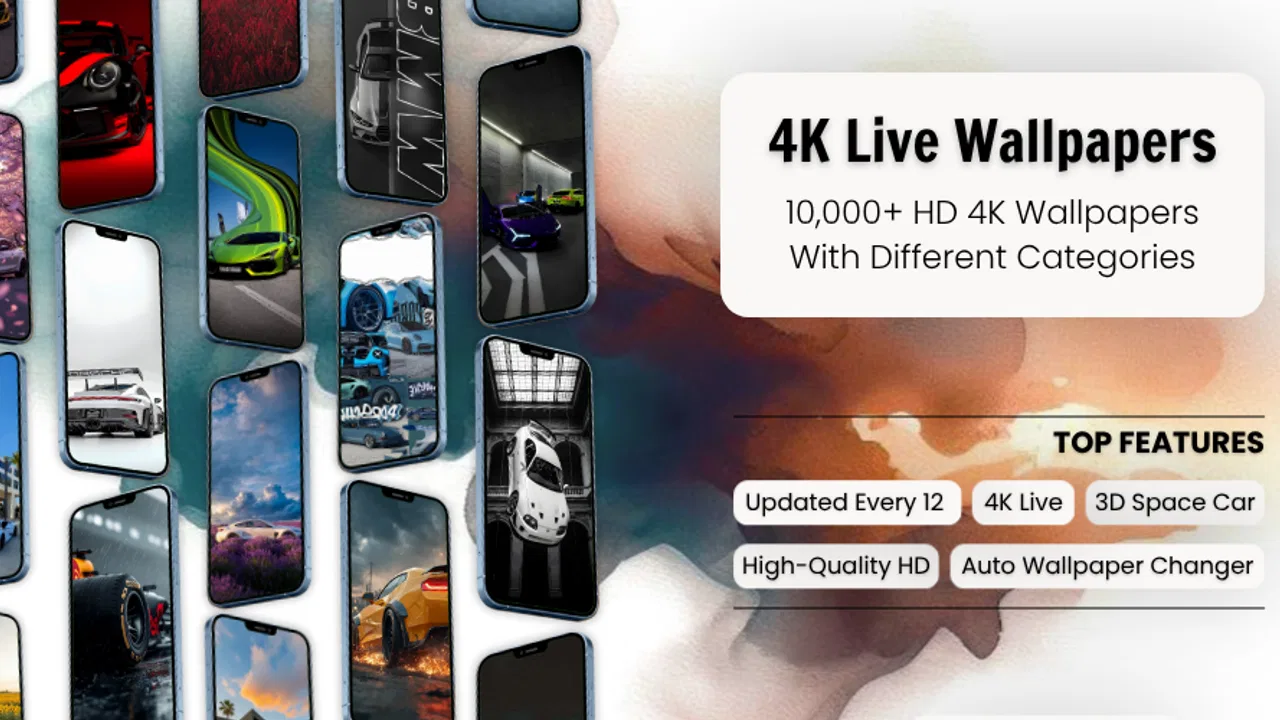
I spent time with Car Wallpaper HD & 4K Live as an art and design app, and my first impression was simple: it is aimed at people who want their phone to feel more personal without spending time making wallpapers from scratch. The focus is cars, with a visual style built around sharp vehicle photography, dramatic lighting, and moving wallpaper presentation. If your lock screen is part of your daily mood, that narrow focus can be appealing.
The app is free, suitable for Everyone, and comes from Midas Studio App. It has passed the early discovery stage with over 50 thousand installs, while the current release is version 1.1.3. It runs on Android 7.0 and later, so compatibility should cover many older phones as well as newer devices. I would describe it as a specialized wallpaper browser rather than a full creative design tool: the value is in choosing a finished car image quickly, not in editing a photograph in detail.
What using the app feels like in everyday life
The most obvious use case is also the strongest one. Imagine unlocking your phone before leaving for work, seeing a low-angle sports car image, and getting a small visual lift before the day starts. A car enthusiast may enjoy changing that look regularly, while someone who simply likes polished automotive photography can use the app as a rotating source of inspiration. The app’s daily-update positioning also makes sense for people who become bored with a single background after a few days.
You May Also Like

 Blood Strike: 2.5 Anniversary
Blood Strike’s Loadouts Turn Every Drop Into a Tactical Gamble
A close look at Blood Strike’s custom loadouts: how fast access to signature weapons reshapes its battle royale rhythm, rewards preparation, and narrows the gap between fights.

 Pandora - Music & Podcasts
Pandora’s Music Is Easy to Start, but Harder to Recover
Pandora’s strength is its low-effort path from a seed to a station. Its weak spot is how much confidence it asks you to place in connection, setup, and quiet recovery.

 8 Ball Pool
8 Ball Pool Is Built on Rivalries, Rematches, and Routine
A close look at the rivalries, rematches, shared routines, and unanswered safety questions that turn a quick pool match into a persistent mobile community.

 Samsung Music
Samsung Music’s Quiet Strength Is Playing What You Already Own
Its reach comes less from spectacle than from dependable access to a personal library. That simplicity is both the app’s strongest retention engine and its ceiling.

 AccuWeather: Weather Radar
AccuWeather Review: A Quick, Clear Forecast for Everyday Decisions
For everyday plans, the best forecast is the one you can understand quickly. AccuWeather makes rain timing, radar, and local conditions easy to act on, with a few trade-offs.

 Hill Climb Racing
Why Hill Climb Racing Still Turns Crashes Into One More Run
A tiny car, a bumpy hill and one more upgrade: Hill Climb Racing keeps resurfacing because its simple chaos makes every near-miss feel personal.
More From Our News Desk



I found the narrow subject helpful because it reduces the endless searching that comes with broad wallpaper platforms. Instead of filtering through landscapes, illustrations, celebrities, and abstract patterns, you begin with a clear theme. That makes the app easier to recommend to a friend who already knows what they want: cars, strong contrast, and a more energetic screen.
The HD and 4K emphasis is best understood as a promise of visual sharpness, not as a guarantee that every image will look equally good on every phone. A high-resolution source can look excellent on a large modern display, but the result still depends on the screen, cropping, brightness, and how the phone handles live backgrounds. On a smaller or older device, a carefully framed HD image may actually feel cleaner than an overly detailed moving scene.
Choosing between a still image and a moving background
Static wallpapers are usually the safer everyday choice. They are predictable, easy to glance at, and less likely to distract from icons or lock-screen text. A live car wallpaper can create more atmosphere, especially when the motion is subtle, but movement is not automatically better. If the animation is visually busy, it may compete with notifications or make the screen feel less calm.
My practical advice is to use a dynamic design on the lock screen only when the subject remains readable behind the clock and alerts. For the home screen, I would favor a darker or less crowded composition so app icons remain easy to find. This is one of the app’s real trade-offs: dramatic automotive imagery looks impressive in a preview, yet the same image can become inconvenient once everyday controls are placed over it.
Before applying anything, I would also check how the preview is cropped. Tall phone screens can cut off a car’s wheels, roofline, or headlights depending on the original composition. A wallpaper that looks balanced in a gallery may lose its main subject when fitted to a particular display. Taking a moment to inspect the framing is more useful than automatically choosing the sharpest-looking option.
Where its design focus helps and where it narrows the experience
As an art and design app, this is a focused visual utility, not a general-purpose editor. I would not open it expecting layers, brush controls, typography tools, color grading, or a way to build a custom poster. Its appeal comes from ready-made presentation. That is a strength for quick personalization, but a limitation for anyone who wants to combine a favorite car photo with text, logos, gradients, or a particular color palette.
Compared with a general wallpaper app, the automotive theme should make discovery more direct. Compared with a phone’s built-in wallpaper picker, it offers a more specialized visual identity. Compared with a full design editor, it is much faster but far less flexible. The right comparison depends on the job: for a finished car background, the focused gallery is convenient; for a personal composition, a design app or your own photo collection remains the better route.
Trust, controls, and moments that deserve attention
I use this section to think about the small decisions that make a wallpaper app feel comfortable to keep around: reading system prompts, checking where a design will appear, and choosing only the access that fits the task. A useful habit is to pause before each confirmation, especially when moving from a preview to applying a live image. That same deliberate approach helps me decide which settings are worth checking before settling into a repeatable routine.
What I can responsibly judge from the visible experience
Trust matters even for something as simple as a wallpaper. A background app may be opened frequently, may display previews, and may invite a user to make choices that affect the phone’s appearance. I look for clear actions, understandable confirmation steps, and a straightforward way to decide whether an image should become the lock screen, the home screen, or both. Those choices should feel deliberate rather than accidental.
With Car Wallpaper HD & 4K Live, I would treat every system prompt as a decision point instead of tapping through automatically. If Android asks for permission or presents a confirmation related to applying a wallpaper, I would read the wording and grant only what is needed for the action I am taking. The app’s purpose does not require me to assume that every prompt is harmless simply because the content is decorative.
That cautious habit is especially useful when trying live wallpaper. A moving background can involve more than selecting a picture: the phone may show a system-level confirmation, offer a preview, or ask where the wallpaper should appear. I prefer to pause at each stage and verify the destination. This prevents the common annoyance of replacing both screens when I intended to change only one.
I also recommend checking the app’s Android-facing information before regular use, particularly if privacy is a major concern. Permissions, data-safety statements, account requirements, and controls can change with updates, so I would review what is currently visible on the app’s store page and in Android settings rather than relying on assumptions about wallpaper apps. I do not treat a simple interface as proof of a particular data practice.
Data-sensitive moments during normal use
The most sensitive moments are not necessarily the wallpaper preview itself. They include any request to access photos, notifications, storage, or other parts of the device. If I am only browsing the app’s own car artwork, I would question a request that seems unrelated to that task. If I decide to use a personal photo, the situation changes, and I would still prefer selecting one specific image instead of granting broad access when Android offers a narrower choice.
Another moment worth watching is the transition from browsing to applying. A user may tap an image expecting a preview and instead reach a system action. I slow down here, confirm the selected image, and check whether the target is the lock screen, home screen, or both. This small workflow is more important than it sounds because wallpaper changes are visible across the phone and can be irritating to undo when made accidentally.
Live content also deserves a little restraint on a limited battery plan. I would begin with a static wallpaper, then test a live option for a day rather than making it the permanent default immediately. That gives me a chance to notice whether the motion feels distracting, whether the phone remains comfortable to use, and whether the result suits my routine. I would not assume that a live wallpaper has no practical cost simply because it is presented as a visual feature.
How much control the user really has
User agency here comes from making small choices consciously. I can decide whether to use a still or moving design, whether to apply it to one screen or more than one, and whether the selected image works with my icons and text. Those decisions sound basic, but they are exactly what separates a pleasant personalization tool from an app that takes over the visual experience.
I would keep a backup favorite in mind before changing the current background. If the new crop looks wrong, the live effect feels too busy, or the image clashes with notification text, returning to a known-good wallpaper is quicker than starting the search again. This is a useful workflow for people who change wallpapers often: test one choice, use it for a while, and keep the previous option available until the new one proves comfortable.
Daily updates can encourage discovery, but they can also create a habit of changing the screen without considering usability. I get more from the app when I treat new content as a source of options rather than a reason to replace a wallpaper every day. A good background should remain attractive after repeated unlocks, not only during the first preview.
Who should use it, and who should look elsewhere
I think the app is a good fit for car fans, drivers who want a more energetic phone aesthetic, and anyone who prefers ready-to-use automotive artwork over manual editing. It is also suitable for someone with an older Android phone who wants a focused wallpaper catalog without needing a modern operating system, since the minimum requirement is Android 7.0.
I would be more cautious about recommending it to users who need extensive customization. If you want to add a quote, match a wallpaper to a case color, build a collage, or use a private photo with detailed adjustments, a dedicated editor will serve you better. I would also steer away from live backgrounds if your priority is maximum simplicity, a distraction-free lock screen, or careful control over battery behavior.
Parents and younger users may appreciate the Everyone rating, but that label should not replace normal device supervision. I would still encourage anyone sharing a phone to understand what is being installed, what prompts appear, and which system choices are being made. The age rating describes suitability; it does not remove the need for sensible privacy and permission habits.
My cautious verdict after weighing the trade-offs
Car Wallpaper HD & 4K Live succeeds because it does not try to be everything. Its identity is clear: car-centered wallpaper discovery with an emphasis on crisp imagery, moving backgrounds, and fresh visual choices. I like that focus for quick personalization, and I can see why a car enthusiast would return to it more often than to a general wallpaper catalog.
My recommendation comes with conditions. I would start with a static image, inspect the crop, and apply it to one screen before committing to a live background. I would read every Android prompt, review the current permission and data-safety information, and avoid granting access that does not match the task. These steps are not signs that the app is difficult; they are sensible ways to keep control of a personalization app.
The free price lowers the barrier to trying it, while the current version, 1.1.3, gives users a clear release point to check when troubleshooting or deciding whether the experience has changed. The developer, Midas Studio App, has built something better suited to fast visual browsing than deep design work. For that specific purpose, I would recommend giving it a try if cars are genuinely your theme.
In the end, I see it as a convenient specialist rather than a universal wallpaper solution. It is worth choosing when you want your phone to reflect an interest in automotive design and you value speed over editing freedom. I would skip it if your ideal background is completely personal, heavily customized, or deliberately quiet. Used with careful attention to permissions, destination settings, and the difference between a preview and an everyday screen, it can make phone personalization enjoyable without asking you to surrender the choices that matter.
FAQs for Car Wallpaper HD & 4K Live
01What is Car Wallpaper HD & 4K Live?
Car Wallpaper HD & 4K Live is a mobile wallpaper application focused on automotive imagery. It provides a collection of high-resolution car backgrounds, including HD, 4K, and animated or live wallpaper options, depending on device compatibility. The app is designed for users who want to personalize their phone with sports cars, luxury vehicles, classic models, racing scenes, and other automotive-themed visuals.
02Does Car Wallpaper HD & 4K Live support both Android and iPhone devices?
Availability and features can vary between Android and iOS versions, so users should check the appropriate store listing before downloading. Some live wallpaper functions may work differently because Android and iPhone handle animated backgrounds in different ways. Your device model, operating system version, screen resolution, and system restrictions may also determine whether every wallpaper format is available.
03Are the wallpapers really available in HD and 4K quality?
The application is promoted around HD and 4K car wallpapers, but the actual quality may differ between individual images. Some backgrounds can look extremely sharp on modern high-resolution displays, while others may be optimized for specific screen sizes or compressed to reduce download times. For the best results, preview each wallpaper before applying it and use a stable internet connection when browsing or downloading.
04Does the app include live wallpapers, and will they affect battery life?
Car Wallpaper HD & 4K Live may include animated backgrounds designed to add motion to your home or lock screen, although support depends on your operating system and device. Live wallpapers generally use more battery and system resources than static images, especially when animations remain active for long periods. If battery life or performance is important, a regular HD or 4K wallpaper may be the better choice.
05Is Car Wallpaper HD & 4K Live free to download and safe to use?
The app may be available as a free download, but some wallpaper collections, premium features, advertisements, or live effects could require payment or include in-app promotions. Before installing, review the store page, permissions, privacy information, and recent user feedback. Avoid granting access that seems unrelated to wallpaper functionality, and download only from the official Google Play Store or Apple App Store.
Pros
- Large collection of HD and 4K car wallpapers
- Includes live wallpapers with dynamic visual effects
- Covers sports cars
- classics
- luxury models
- and racing themes
- Simple browsing makes finding wallpapers quick
- Supports customization for different screen styles
Cons
- Some premium wallpapers or features may require payment
- Live wallpapers can consume more battery than static images
- Ad interruptions may affect the browsing experience
- High-resolution downloads can use considerable storage space
- Compatibility may vary across devices and Android versions

Car Wallpaper HD & 4K Live
Gallery